Two apps, one port, and no error
On a Mac, two dev servers can share a port without a word, and the browser ends up talking to both. What happened, how to try it, and why Linux refuses.

Moe Babazadeh
I hit this on a hobby project while my work stack was still running: a dev server and its Docker container. My app started on port 3000 without a word, even though the work server was already on it. Then pages kept reloading, and now and then I landed on the work app's login screen.
I moved to macOS three or four years ago, and this one still surprised me.
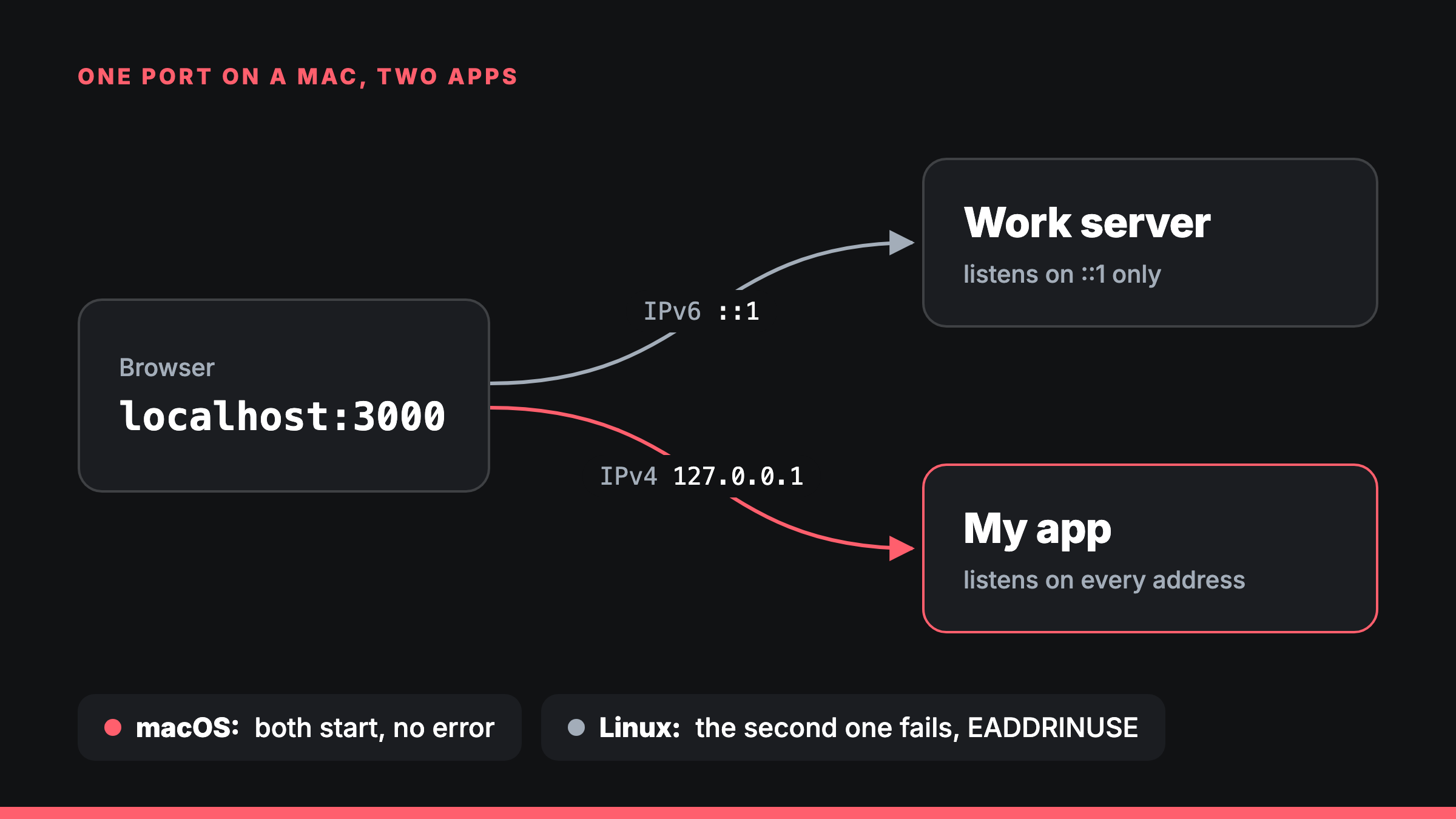 localhost:3000 had two answers: IPv6 went to one app, IPv4 to the other.
What was going on
Three things lined up:
- The work server listened only on
::1, the IPv6 address for localhost. Since Node 17, Node keeps the system's order when it looks uplocalhost, and macOS lists::1first. So a server told to uselocalhostends up on IPv6 only. - My app listened on every address. With no host given, Node listens on
::, which takes IPv4 connections as well. - macOS let both have the port. Node turns on
SO_REUSEADDRfor every server it starts. On macOS that lets two servers share a port as long as their addresses aren't exactly the same, and each connection goes to the most specific match.
So localhost:3000 had two answers: ::1 reached the work server and 127.0.0.1 reached my app. The browser used both, so a page from one app could load its files or follow a redirect from the other.
Dev servers only move to the next port when listening fails with "address in use". Here it never failed.
Try it
On a Mac, in two terminals:
node -e "require('net').createServer().listen(3333, '::1')"node -e "require('net').createServer().listen(3333)"Both keep running. lsof -nP -iTCP:3333 -sTCP:LISTEN lists one on [::1]:3333 and the other on *:3333.
On Linux, the second one stops straight away:
Error: listen EADDRINUSE: address already in use :::3333macOS and Linux disagree
I ran the same test on both, with the socket settings Node uses: one server on the port first, then a second one beside it.
| First server | Second server | macOS | Linux |
|---|---|---|---|
::1 | every address | both start | second fails |
| every address | ::1 | both start | second fails |
127.0.0.1 | 0.0.0.0 | both start | second fails |
0.0.0.0 | 127.0.0.1 | both start | second fails |
127.0.0.1 | every address | both start | second fails |
::1 | ::1 | second fails | second fails |
Linux's manual says it plainly: once a server is listening on the wildcard address, nothing else can bind to that port. macOS keeps the older BSD rule, where only the exact same address counts as taken.
Docker too
A container published on 127.0.0.1 falls into the same trap. With docker run -p 127.0.0.1:3000:8000 … running, a dev server on every address still starts on port 3000: IPv4 reaches the container and IPv6 reaches the dev server.
Published the usual way (-p 3000:8000), Docker takes every address, and the dev server gets "address in use", which is what you want.
I'm not the first
In 2021, someone on macOS ran Vite and a Koa server on port 3000 and got no warning, whichever started first (vitejs/vite#5241). In 2026, a dev tool's port check was fooled the same way and now checks 127.0.0.1 and ::1 as well (jdx/pitchfork#345).
What I do now
-
One port per project. This site runs on 3100 now.
-
Check who is listening when a dev server acts strange. Two lines here means two apps:
sh lsof -nP -iTCP:3000 -sTCP:LISTEN -
Ask both addresses to be sure. If the answers differ, so do the apps:
sh curl http://127.0.0.1:3000 curl "http://[::1]:3000"
Sources
- Node.js
netdocs: with no host, a server listens on::, and every socket getsSO_REUSEADDR. The flag is set in libuv'stcp.c. - Node.js
dnsdocs: v17.0.0 changed the default lookup order to the system's own. - Linux
socket(7), onSO_REUSEADDR. - Vite's
server.hostoption, which warns that browsers may use a different address than the one Vite listens on.